

I first heard about Exlvia from a friend who runs a small design studio. She mentioned it offhand, in the middle of complaining about how many apps she had open at once, and said something like “honestly Exlvia is the only thing that hasn’t annoyed me yet.” That’s a pretty low bar for software, if you think about it, but also kind of the highest praise you can give a tool these days. Everything is supposed to make your life easier and half the time it just adds another tab to keep track of.
So I looked into it. Here’s what I found, plus my own take after actually poking around with it for a while.
What Exlvia Actually Does
Exlvia is a workflow tool. That’s the boring one-line answer. In practice, it’s the kind of app that sits between your to-do list and your calendar and your project notes, and tries to be the thing that connects all of them without you having to manually update three different places every time something changes.
If you’ve ever updated a task in one app, then had to go remember to also update it in your calendar, then also mention it in a Slack message to your team — Exlvia is built to kill that whole chain of busywork. You do it once, in Exlvia, and it pushes out to the rest.
Is it perfect at this? No. Nothing is. But it’s noticeably less clunky than a lot of the alternatives I’ve tried.
Why It’s Getting Attention Right Now
I think part of why Exlvia is having a moment is timing. There’s been a bit of fatigue with software that tries to do absolutely everything. You open it and there are forty buttons and three sidebars and a settings menu with more options than your actual phone. Exlvia doesn’t do that. It feels almost stripped down in comparison, which some people love and some people find limiting, depending on what you’re used to.
I’ll be honest, when I first opened Exlvia I thought “wait, is this it?” because it looked so simple. Turns out that’s kind of the point. The simplicity is a feature, not a missing feature.
Getting Set Up
Setting up Exlvia doesn’t take long. You sign up, it asks a handful of questions about how you plan to use it — solo work, small team, bigger org, whatever — and then it builds you a starting layout based on that. You’re not stuck with it though. I moved things around within the first ten minutes because I didn’t love where my calendar widget landed by default.
A rough version of how it goes:
You make an account.
It asks what you’re using it for.
You land on a dashboard that’s already sort of set up for you.
You connect whatever other tools you already rely on.
You build one automation just to see how it feels.
That last step is honestly the one people skip and shouldn’t. The automation piece is where Exlvia actually saves you time, not just the dashboard itself.
The Features Worth Knowing About
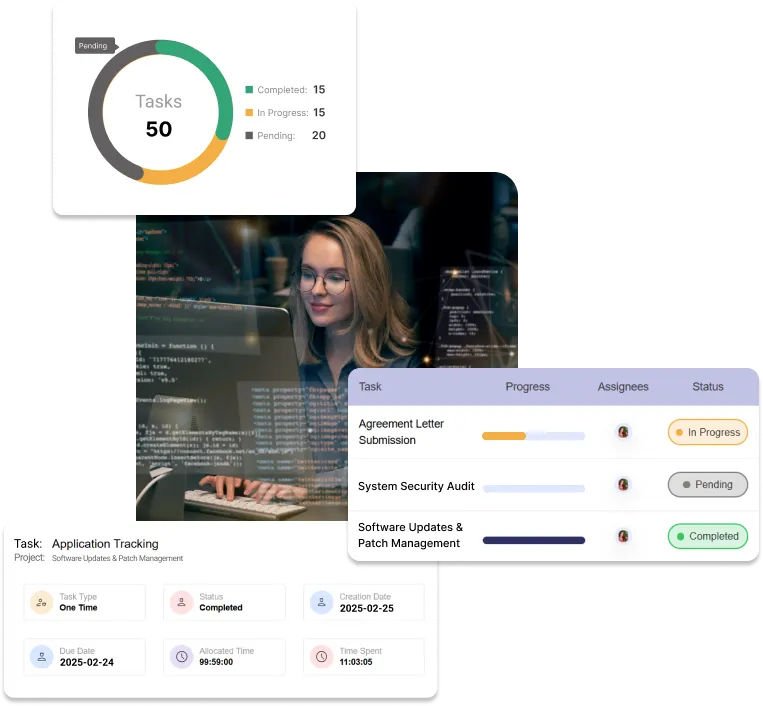
Automation is the headline feature. You set a rule — say, when a task gets marked done, notify a specific person — and Exlvia just handles it from then on. It sounds small but it adds up over a week.
The interface is clean, almost to a fault. Some people who are used to busier tools find it a little bare at first. I got used to it within a day or two and now I actually prefer it.
It connects to other apps you’re already using. Calendars, chat tools, storage — Exlvia doesn’t try to replace everything you have, it just plugs into it. Which, frankly, is the smarter approach. Nobody wants to rebuild their entire system for one new app.
The dashboard can be rearranged. I know that sounds minor but if you’re someone who likes your most-used stuff front and center, it matters more than you’d think.
There’s also a shared workspace setup for teams, with comments and permission controls, so people aren’t accidentally editing things they shouldn’t be touching.
Who’s Actually Using This Thing
From what I’ve seen, it’s not just tech people. A freelance friend uses Exlvia to track client work. My cousin, who runs a tiny online shop, uses it for inventory and order scheduling. Even a grad student I know has started using Exlvia just to keep her thesis timeline from turning into chaos.
The common thread seems to be people who have too many moving parts to track in their head, but don’t want or need something as heavy as full enterprise software. Exlvia sits in that middle zone.
Small and mid-sized teams especially seem to gravitate toward it. Big enough that a plain checklist app doesn’t cut it anymore, small enough that a giant corporate platform would be overkill.
Where It Falls Short
I don’t want to make Exlvia sound flawless because it isn’t. The automation builder, while useful, isn’t the most intuitive thing the first time you use it. I had to redo my first rule twice because I misunderstood how the trigger worked. Once you get it, it’s fine, but that initial learning moment is a little rough.
The mobile app is also just okay. It works, but it feels like an afterthought compared to how polished the desktop version is. If most of your work happens on your phone, that’s worth knowing going in.
And because Exlvia connects to a bunch of outside apps, every once in a while something doesn’t sync right away. It’s usually fixed within minutes, but it can be a little annoying mid-task.
How It Compares to Other Options
I’ve used a handful of similar tools over the years, and Exlvia lands in an interesting spot. It’s more capable than a basic list app but way less overwhelming than the big enterprise systems that require an actual training session to use properly.
If you’ve bounced between “this is too simple” and “this is way too much,” Exlvia is aiming for the gap in between. Whether it hits that gap for you depends on your own workflow, honestly. There’s no universal right answer here.
A Few Things I’d Suggest If You Try It
Don’t try to automate everything on day one. Start with one rule, get comfortable, then build from there.
Actually use the dashboard customization. It takes two minutes and makes a real difference in how the app feels day to day.
Hook up your existing tools early rather than waiting. It makes the whole transition smoother.
Revisit your automations every so often. What made sense when you set Exlvia up three months ago might not fit how you’re working now.
If you’re on a team, check out what other people are doing with it. I picked up a couple of workflow tricks just from watching how a coworker had set hers up.
What’s Next for Exlvia
Judging by the update pattern so far, it seems like the people behind Exlvia are more interested in polishing what’s already there than piling on new features for the sake of it. That’s reassuring, honestly, because a lot of tools go the opposite direction and end up bloated within a year or two.
There’s also talk of expanding the list of apps Exlvia integrates with, which would make it even more useful for people juggling a wide mix of tools. If that happens, I could see Exlvia becoming one of those apps people just quietly rely on without really thinking about it — which, for a productivity tool, is probably the highest compliment there is.
Final Take
I went into this expecting another overhyped productivity app, and came out somewhat won over. Exlvia isn’t going to fix a genuinely disorganized workflow on its own, no software does that, but it removes a lot of the small friction that builds up over a normal week.
If you’re curious, the easiest way to know if Exlvia works for you is just to try it for a week. Connect a couple of tools you already use, set up one automation, and see how it feels once it’s actually part of your routine instead of just sitting there. That’s really the only way to know with something like this.





I’m intrigued by the emphasis on user-friendly design in Exlvia. It’s refreshing to see productivity tools prioritize accessibility for all users. this one
The integration of collaboration features in Exlvia sounds like a game-changer for team projects. It’s exciting to see tools evolving to enhance communication and streamline workflows for better productivity. this resource
The ability to customize workflows in Exlvia really caught my attention. It’s crucial for users to tailor tools to their specific needs, and this feature seems to support diverse work styles effectively. Excited to see how this can enhance productivity! relevant link
The time management feature in Exlvia seems particularly beneficial for tackling tight schedules. Effective prioritization tools can really help users maximize their productivity and stay organized throughout the day. Looking forward to trying this out! good resource
The advanced analytics feature in Exlvia really stood out to me. Leveraging data to inform decision-making is so crucial in today’s fast-paced environment, and having those insights readily available can empower users to make informed choices for better productivity. Can’t wait to see how this impacts performance! check this out
I’m really impressed by the focus on automation features in Exlvia. The ability to streamline repetitive tasks can significantly free up time for more critical thinking and creativity. It’s a practical approach to enhance productivity in today’s busy work environments! this resource
The feature allowing task prioritization in Exlvia really piqued my interest. In a world where distractions are rampant, having a clear way to rank tasks can significantly boost focus and ensure that the most important work gets done first. It’s a valuable addition for anyone looking to optimize their daily workflow! see here
The mention of automated task reminders in Exlvia is a fantastic feature that can truly revolutionize how we manage our to-do lists. Staying on top of deadlines is essential, and this tool seems to provide a seamless way to ensure nothing slips through the cracks. I’m curious to see how this will improve my daily productivity! this one
The seamless integration of task management tools in Exlvia caught my eye, particularly for someone juggling multiple projects at once. It’s encouraging to see how these features can help keep everything organized and enhance overall efficiency. I often rely on a helpful free resource for organizing my tasks, which complements these capabilities beautifully.
The focus on analytics features in Exlvia really piqued my interest. The ability to leverage data for better decision-making can transform how we approach our tasks daily. Having insights readily available can enhance not only personal productivity but also team efficiency. I’m eager to see how this can be implemented in real-world scenarios! I often rely on a helpful free resource to enhance my organizational skills.
The focus on the automation features in Exlvia really resonates with me. Automating repetitive tasks can make a huge difference in efficiency and help users focus on high-priority projects. It’s exciting to think about how this could reduce burnout and increase overall productivity. Additionally, I often rely on a helpful free resource to stay organized and manage tasks more effectively.
Looking for effective strategies to increase my website’s organic traffic. Any advice?