

There’s a certain kind of frustration that comes from needing to quickly edit a photo and realizing your go-to desktop software is slow, expensive, or just overkill for a simple task. You don’t want to open Photoshop to remove a background. You don’t want to install another app just to enhance a blurry image. You just want to get the job done, fast, from wherever you happen to be sitting.
That’s the exact space YouCam Online Editor is designed to fill.
It’s a cloud-based photo editing platform that runs entirely in your browser — no downloads, no installations, no subscriptions required to get started. And while tools like that often sound better than they are, YouCam Online Editor has enough genuine capability packed into it that it’s worth understanding in detail before you dismiss it as just another web editor.
This review covers everything: what it actually does well, where it falls short, who it’s built for, and whether the paid tier is worth it.
What Is YouCam Online Editor?
Unlike the mobile YouCam apps for selfies and beauty filters, YouCam Online Editor is designed for more general photo editing — portraits, landscapes, product photos, social media content, and generative AI image creation.
One of the most useful features of the platform is that it is available from any browser, on either desktop or mobile.
You don’t need to be at a specific computer or have a particular device. As long as you have internet access and a browser, YouCam Online Editor is ready to go.
What makes it more interesting than a basic web editor is the degree to which AI powers the experience. Almost every major feature in YouCam Online Editor uses artificial intelligence to automate tasks that used to require manual skill — things like selecting and removing backgrounds, enhancing image quality, extending the edges of a photo, or generating a professional headshot from a casual selfie.
The Features That Actually Matter
AI Photo Enhancer
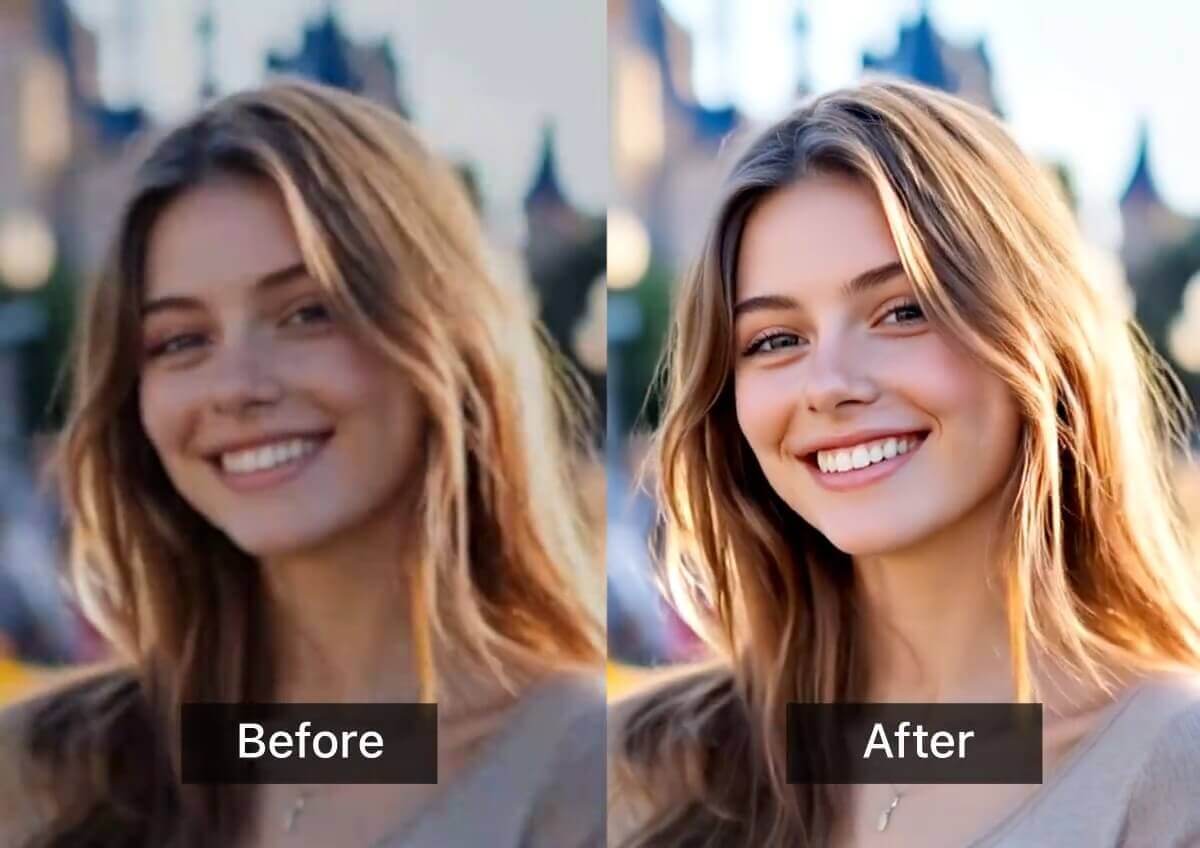
This is probably the feature most people reach for first, and it delivers. The AI photo enhancer in YouCam Online Editor analyzes your image and automatically improves sharpness, lighting, color balance, and overall quality. It works well on portraits and reasonably well on landscapes and general photos.
It won’t replace manual color grading for professional photography work, but for everyday images — vacation photos, product shots, social media posts — the one-click enhancement is fast and noticeably effective. Images that looked flat or slightly underexposed come out looking genuinely better without you adjusting a single slider.
Background Removal and Replacement
YouCam Online Editor handles background removal cleanly, particularly on portrait photos where the subject is clear. The AI identifies the foreground subject and strips the background without the jagged edges or leftover artifacts that plague lower-quality tools.
Beyond simple removal, you can replace the background with solid colors, custom images, or blurred versions of the original — which is genuinely useful for product photography, professional headshots, or social media profile images. The background blur feature deserves a specific mention because it does a convincing job of mimicking the depth-of-field effect you’d normally get from a camera with a wide aperture.
Object Removal
Unwanted elements in a photo — a photobomber in the background, a piece of trash on the ground, a distracting sign — can be selected and removed through YouCam Online Editor‘s object removal tool. The AI fills in the space left behind by analyzing the surrounding area and generating plausible content to replace it.
It works better on simple backgrounds than on complex ones, which is true of virtually every AI object removal tool on the market right now. On simple backgrounds like walls, grass, or sky, it’s impressively clean. On complex backgrounds with a lot of texture and detail, results are more hit-or-miss.
AI Image Extender
This feature extends the edges of your image — essentially adding more visual content beyond the original borders using AI generation.Good for when you need a wider aspect ratio than your original photo, or want to reframe a composition without cutting anything out.
The quality of the extension depends heavily on the complexity of the original image’s edges. Simple scenes extend well. Complex ones can produce oddities at the borders. But for many practical use cases — social media headers, wallpapers, banner images — it does the job without requiring any manual effort.
AI Colorization
Old black and white photos can be colorized automatically by YouCam Online Editor‘s AI. The results are genuinely impressive for family photos and historical images. Colors aren’t always perfectly accurate, but the overall effect is convincing enough to make old photographs feel alive in a way they haven’t for generations.
If you have old photos of family members you’d like to see in color, this feature alone might make YouCam Online Editor worth visiting.
AI Image Generator and Avatars
YouCam Online Editor includes generative AI tools — text-to-image generation, AI avatar creation, AI headshot generation, hairstyle generation, and makeup transfer. You can type a description and get an AI-generated image, or upload a selfie and get a professional-looking headshot back.
The headshot generator is surprisingly useful for people who need a professional profile photo but don’t have access to a photographer. Results vary depending on the quality of the source photo, but a clear, well-lit selfie usually produces a presentable output that would work fine for a LinkedIn profile or professional directory.
How easy is it to use?
YouCam Online Editor is all about accessibility and it shows. The interface is simple and no photo editing experience is needed to explore. . Most features work through simple upload-and-click workflows — you upload a photo, select the tool you want, and the AI does the heavy lifting.
There are basic manual controls too — crop, flip, rotate, resize — for people who want more hands-on control. But the platform’s strength is clearly in the AI-powered tools rather than manual editing precision. If you want to do detailed layer-based editing or precise color correction, YouCam Online Editor isn’t the right tool. If you want fast, effective AI-assisted edits without a learning curve, it’s hard to beat.
Pricing — What’s Free and What’s Not
Here’s the part that matters to a lot of people: YouCam Online Editor is free to use with no hard limit on the number of images you can edit. That’s genuinely more generous than most tools in this category.
The free tier gives you access to the core editing tools, though with some limitations — watermarks on certain outputs, lower resolution downloads, and restricted access to the generative AI features.
The paid tier — YouCam Online Editor Plus — runs around $9.99 per month and includes 100 credits monthly for the premium AI tools, watermark-free downloads, and higher resolution exports. For casual personal use, the free tier is workable.The Plus plan is a reasonable investment if you’re a regular content creator using it for professional photos or business.
One fair criticism worth mentioning: the subscription structure across the entire YouCam ecosystem can be confusing.
If you use multiple YouCam apps alongside YouCam Online Editor, figuring out which subscription covers which features across which products isn’t as clear as it should be.
Who Is YouCam Online Editor Best For?
Content creators and social media users are the most obvious fit. The combination of background removal, AI enhancement, and generative AI tools covers most of what someone posting regularly to Instagram, LinkedIn, or TikTok actually needs.
People who need occasional professional photos — specifically headshots — will find the AI headshot generator surprisingly useful. It won’t replace a real photographer for high-stakes uses, but for a decent LinkedIn photo or a team directory image, it delivers.
Anyone restoring old family photos will appreciate the colorization feature. It’s one of the more emotionally satisfying uses of AI photo technology available to regular people without any technical skills.
Small business owners doing their own product photography will get value from the background removal and replacement tools. Consistent, clean product images are much easier to produce when you can reliably strip and replace backgrounds without hiring a designer.
Casual users who want quick fixes — better lighting, sharper images, removed backgrounds — without installing anything or paying for software they’ll use twice a year.
Where It Falls Short
Every tool has limits, and YouCam Online Editor is no exception.
Video editing is minimal. There’s a video enhancement feature, but compared to dedicated video tools, YouCam Online Editor doesn’t offer serious video editing capability. If video is a significant part of what you do, this isn’t your primary tool.
AI generation quality is good for casual use but not for professional creative work. The text-to-image generator and avatar tools produce results that work well for personal use and social media, but they’re not at the level of dedicated generative AI platforms for professional creative projects.
And complex background removal — particularly in photos with intricate edges like flyaway hair or fine texture — still produces imperfect results, as it does on virtually every AI background removal tool available today.
The Bottom Line
YouCam Online Editor is a genuinely useful tool for the people it’s designed for. It won’t replace Photoshop for professional photographers or dedicated generative AI platforms for creative professionals. But that’s not what it’s trying to do.
For casual users, content creators, small business owners, and anyone who needs fast, accessible, AI-powered photo editing without installation or a steep learning curve, YouCam Online Editor punches well above its weight — especially given that the core features are available completely free.
If you edit photos even occasionally and haven’t tried YouCam Online Editor, it’s worth fifteen minutes of your time. That’s all it takes to see whether it fits your workflow.





I was looking for a quick and easy way to edit images without the hassle of downloading heavy software, and it looks like YouCam Online Editor could be the solution. The ability to perform tasks like background removal and AI image enhancement directly from the browser is super convenient. Plus, it’s great that it’s accessible from any device with an internet connection. It’s interesting to see how AI integration is making photo editing more accessible, almost like the MixVio image to video tool could offer similar ease for video creation.