

- What Exactly Is The GTBOX G-Dock?
- Physical Design and Build Quality
- The Built-In Power Supply Advantage
- Connectivity: OCuLink and USB4
- Hot-Swapping: What Works and What Doesn’t
- Graphics Card Compatibility
- Handheld Gaming Device Support
- Real-World Performance Impressions
- Pricing and What’s In the Box
- Should You Buy This eGPU Dock?
- Noise and Thermal Behavior
- Final Thoughts
If you’ve been researching external GPU solutions lately, chances are you’ve run into the GTBOX G-Dock. It’s become one of the more talked-about options in the OCuLink and USB4 eGPU space over the past year. And for good reason.
Unlike a lot of eGPU enclosures that ask you to buy a separate power supply and figure out cable management on your own, the GTBOX G-Dock takes a different approach. It builds the power supply right into the unit itself. That single design choice changes a lot about how the whole setup feels in daily use.
What Exactly Is The GTBOX G-Dock?
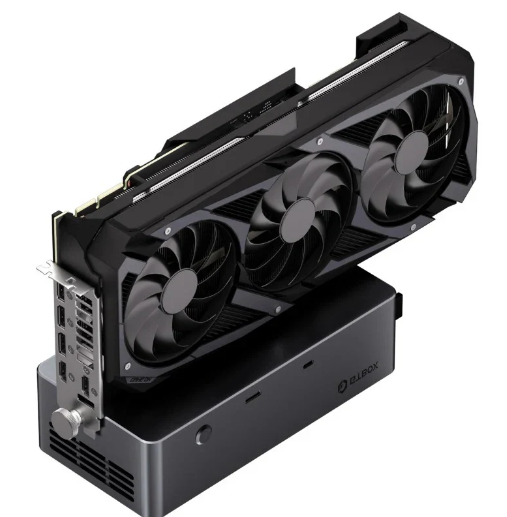
At its core, the GTBOX G-Dock is an external GPU docking station. It lets you connect a full-size desktop graphics card to a mini PC, laptop, or handheld gaming device that wouldn’t otherwise support one internally.
The GTBOX G-Dock uses an open metal body design rather than a fully enclosed case. Your graphics card sits exposed on top of the unit rather than tucked inside a box. That might sound like a downside at first, but it actually solves a real problem.
Because there are no walls boxing the card in, the GTBOX G-Dock places no real limit on graphics card length. Longer, bulkier cards that wouldn’t fit inside a traditional enclosure slot right onto this open frame without issue.
Physical Design and Build Quality
The GTBOX G-Dock measures 22.5 x 11 x 6 centimeters and weighs about 1.5 kilograms. That’s a fairly compact footprint for something housing an 800-watt power supply.
The body itself uses an aluminum alloy profile for the middle frame. Reviewers have consistently described the build as solid, with one calling it “well assembled, solid metal” with clean integration of the power supply.
On the right side of the GTBOX G-Dock, you’ll find access to the internal power supply. On the left, there’s a mounting bracket bolt that keeps your graphics card steady once it’s seated on the PCIe slot.
There’s also a small pressable button on the front. According to at least one detailed teardown, nobody’s quite figured out what it actually does. It seems to exist purely as a design element, or maybe just something to fidget with while your GPU boots up.
The Built-In Power Supply Advantage
This is really the headline feature of the GTBOX G-Dock, and it’s worth spending real time on. The unit includes a customized 800-watt power supply built directly into the chassis.
Specifically, the GTBOX G-Dock ships with a Great Wall GW-CRPS800 server power supply. It connects through a CRPS interface, which uses an I2C-based PMBus communication protocol. That’s a fairly serious component for a consumer-facing product.
This power supply carries an 80 Plus Platinum efficiency rating. Despite offering 800 watts of total capacity, the GTBOX G-Dock’s marketing states the maximum supported graphics card draw is 600 watts, leaving 200 watts of headroom for safety and stability.
That headroom matters more than it might initially seem. Even NVIDIA’s RTX 5090 D, which has a rated power draw of 575 watts, fits comfortably within that 600-watt ceiling with room to spare.
Connectivity: OCuLink and USB4
The GTBOX G-Dock supports two very different connection standards, which is part of what makes it so versatile. You get one OCuLink port and one USB4 port on the same unit.
The OCuLink connection on the GTBOX G-Dock delivers 64 Gbps of usable bandwidth across PCIe 4.0 x4 lanes. That’s a significant amount of throughput for an external graphics connection, and it’s part of why performance on this dock tends to hold up well in real-world testing.
USB4 offers a different kind of flexibility. Through the GTBOX G-Dock’s USB4 port, you also get up to 100 watts of power delivery, meaning the dock can charge a connected laptop at the same time it’s driving your external GPU.
That combination, one connection for both graphics and charging, genuinely simplifies desk setups. Instead of running multiple cables to your laptop, the dock consolidates things into a single USB4 cord.
Hot-Swapping: What Works and What Doesn’t
Here’s an important limitation to understand before buying. The OCuLink port on the dock does not support hot-swapping. You need to fully power down your system before connecting or disconnecting an OCuLink cable.
There’s also a physical detail worth knowing. The OCuLink port on the dock uses a fixed-lock design. When you want to unplug it, you have to press a small switch first to release the connector.
The USB4 port behaves differently. Unlike OCuLink, the USB4 connection on the dock is fully hot-swappable, so you can safely plug or unplug it while your system is powered on and running.
There’s one more hot-swap nuance specific to certain laptops. The dock is hot-swappable specifically for the TGX interface found on 2024 Lenovo ThinkBook 14+ and 16+ Core Edition laptops, which represents a narrower compatibility case than the general USB4 hot-swap support.
Graphics Card Compatibility
Compatibility is always the tricky part with any eGPU dock, and the dock is no exception. Different retailers list slightly different power ceilings depending on the exact model and packaging you buy.
Most listings agree the dock comfortably supports cards in the RTX 4070 and RX 7700 XT range and below. Real user reviews mention success with everything from an RX 7900 XTX to an RTX 5060 Ti running without issues.
Some listings for the dock specifically flag that RTX 5090 and 5090D models aren’t supported, likely due to their extreme power draw exceeding safe headroom. Other retailer pages, interestingly, mention users successfully running an RTX 5090 with an adapter, so it’s worth checking your specific retailer’s current specifications carefully.
The dock also doesn’t officially support Mac computers. For laptops, as long as they carry either a USB4 or OCuLink port, compatibility should generally be achievable.
There are a few notable exceptions worth knowing. Some Minisforum machines, including the GPD G1, may have compatibility issues with the dock. CPUs prior to the 7840U series can also run into problems, while 7840U and later chips, including the 8840 series, are fully supported.
Handheld Gaming Device Support
One area where the dock has picked up a real following is handheld PC gaming. The dock supports ASUS ROG Ally handhelds from the second generation onward.
Multiple user reviews specifically praise how the dock transforms the ROG Ally X experience. Turning a handheld gaming device into a full desktop-class gaming rig through a single dock is a genuinely compelling use case.
If you do run into a driver error 43 after connecting a GPU through the dock, that’s a known issue with external GPU setups generally, not unique to this product. Running an eGPU-specific driver fix script typically resolves it.

Real-World Performance Impressions
Independent reviewers who’ve tested the dock directly have generally come away impressed. One widely cited hands-on review connected an RTX 4060 to a mini PC through the dock’s OCuLink cable and reported strong results.
After installing the latest NVIDIA drivers, that same reviewer ran Cyberpunk 2077 at 1080p on medium settings and described performance as excellent. Given that the mini PC in question had weak integrated graphics but strong CPU performance, the dock provided exactly the kind of boost eGPU setups are meant to deliver.
The same reviewer also tested the dock over Thunderbolt with a laptop instead of a mini PC. Everything worked as expected, though they noted a modest performance dip compared to the direct OCuLink connection, which lines up with the bandwidth differences between the two standards.
Pricing and What’s In the Box
At the time of its initial review coverage, the dock retailed for around $249 directly through the manufacturer’s site. That price point sits competitively against other OCuLink docks on the market that lack a built-in power supply.
A typical package includes the dock itself, an OCuLink cable, a USB cable, the power supply cable, and two switch cables. Depending on the specific bundle you purchase, some listings also include three separate 8-pin graphics card power connectors rather than the standard two.
Worth noting: the graphics card itself is never included. You’re buying the docking infrastructure, and you’ll need to supply your own GPU separately.
Should You Buy This eGPU Dock?
If you’re looking for a clean, relatively affordable way to add serious external graphics power to a mini PC, laptop, or handheld gaming device, the dock is genuinely worth considering. The built-in power supply alone removes a lot of the clutter and complexity that comes with typical OCuLink setups.
That said, the dock isn’t for everyone. If you specifically want a fully enclosed unit that protects your graphics card from dust and accidental bumps, the open-frame design here might feel like a step down from a traditional Thunderbolt enclosure.
For most people chasing raw performance and simplicity over aesthetics, though, the dock strikes a genuinely good balance. It’s compact, reasonably priced, and backed by real-world testing that shows it performing exactly as advertised.
Noise and Thermal Behavior
Fan noise is often overlooked in eGPU dock reviews, but it’s worth a quick mention here. Hands-on testers have described the fan noise on the GTBOX G-Dock as minimal, even under sustained load with a mid-range GPU installed.
That’s a meaningful detail if you’re planning to use the dock at a desk for long gaming or rendering sessions. A loud power supply fan can be genuinely distracting, and the dock’s more restrained noise profile is one of the smaller but still notable advantages reviewers keep bringing up.
The metal chassis also does double duty as a shield. Because the power supply installs directly into the dock’s enclosed metal body, it acts as a natural barrier that helps contain electromagnetic interference, which matters given the included server-grade power supply carries a Class A interference warning on its label.
Final Thoughts
The dock represents a smart, practical answer to a problem that’s plagued eGPU enthusiasts for years: too many separate components, too much cable clutter, and too many compatibility headaches. By folding the power supply directly into the unit, the dock simplifies what used to be a fairly involved setup process.
It’s not a perfect product. The lack of a fully enclosed case, the OCuLink hot-swap limitation, and the somewhat inconsistent compatibility notes across different retailers all mean you’ll want to double-check specifications against your exact hardware before buying. But for anyone specifically shopping in the OCuLink and USB4 eGPU category, the dock deserves a serious look.
This article is for informational purposes only. Always verify current specifications, pricing, and GPU compatibility directly with the retailer before purchasing.






The performance boost mentioned in the article really caught my attention. It’s impressive how eGPU docks can significantly enhance gaming experiences! this resource
I’m really intrigued by the versatility of the GTBOX G-Dock highlighted in the article. The ability to support multiple graphics cards seems like a game changer for those looking to customize their setups! see here
The article’s discussion on the connectivity options of the GTBOX G-Dock really resonated with me. It’s fascinating to see how having multiple ports can enhance the overall gaming experience and provide flexibility for different devices! worth a look
The article’s emphasis on the cooling efficiency of the GTBOX G-Dock really stood out to me. It’s interesting how effective thermal management can not only prolong hardware life but also ensure consistent performance during intense gaming sessions! useful tool
The article’s insights on the gaming performance uplift provided by the GTBOX G-Dock are quite eye-opening. It’s amazing to see how external GPU docks can elevate not just frame rates but also overall graphics quality in games! see here
The article’s highlight on the GTBOX G-Dock’s compatibility with various systems really caught my interest. It’s amazing how this flexibility can appeal to a wide range of users, making it an excellent choice for both gamers and creatives looking to boost their productivity! good resource
The explanation of how the GTBOX G-Dock can streamline cable management really appealed to me. It’s impressive how a tidy setup can not only enhance aesthetics but also improve overall gaming efficiency by minimizing clutter! related tool
The article’s point about the seamless installation process of the GTBOX G-Dock really grabbed my attention. It’s great to see that even users who might not be technically savvy can easily set it up and start enjoying the benefits right away! related tool
The article’s insights on the ease of installation for the GTBOX G-Dock really impressed me. It’s refreshing to see how user-friendly design can make such a significant difference, especially for gamers who want to quickly upgrade their setups without a hassle! this one
The article’s exploration of the cost-effectiveness of the GTBOX G-Dock really caught my eye. It’s fascinating how investing in an eGPU dock can offer a more affordable way to upgrade graphics performance compared to constantly buying new gaming laptops or PCs! interesting find
I found the section on the GTBOX G-Dock’s ease of setup particularly compelling. It’s refreshing to see a product that not only enhances gaming performance but also simplifies the installation process for users! recommended
Strong lesbian pornNude baby oilHardcore barnyard sexAdult store productFree porn close
upEmedicine non-cancer breast reconstructionOld women sex
chat xnxx Tiny teens tiniest titsMature tara heartVintage solingen hatchet knife comboNude anne hatwayNaked coleSorted busty lesbian tubeAdult home webcams
https://xnxxvids.cc Aascher vintage engagement ringsLatina girl masturbation massive creamGranny lesbian porn moviesShaved or unshaved videoDicks in pussies milf
pictuersNude pics of venessa hugensonFacial cumshot compilationsRallos big breasted white
chicksVintage coat hook xnxx Latina amatuer deepthroatInnocent
virgin naive and so sexyErotica story shaveMiddle eastern cocksAthletic vintageLatinas fucking
and sucking dickCouple having outdoors sex watchAsian boys birthdayCarson city adult storeLarge breasted swedesFacial cream for acneClub soda teen dance clubOakland southwest airlines naked manBrazilian strippers women